Seven Things I Learned Fixing a 100x Database Regression
A database migration once left me with a 100x performance regression in production. Queries that had been fast were suddenly crawling, and some were failing outright under load. I had to diagnose and fix it, quickly. This is what that taught me.
One note before the list: I've kept this database-agnostic on purpose. The exact setting names and syntax differ between engines, each has its own vocabulary, but the underlying mechanisms, and the mistakes, are remarkably consistent. Where something is engine-specific, I've said so. Look up the equivalent for whatever you run.
1. Audit your configuration before you touch a single query
The first thing I found was that the problem wasn't really the queries, it was the settings underneath them. The migration had quietly left two categories of configuration mistuned: how much memory the database had to work with, and how much concurrency it could use to process requests.
Every database keeps recently used data and in-flight work in memory, because memory is fast and disk is slow. Call it the buffer, the cache, or the buffer pool, the name varies, but the job is the same. When that memory allocation is too small, the database is forced to spill working data to disk, which is orders of magnitude slower and contends with everything else trying to use that disk.
Now layer on concurrency. Databases use some number of parallel workers to process and write data; some engines let you tune this directly, others manage it more automatically. When there isn't enough concurrency to keep up, work backs up.
Combine the two and you get a cascade, which is exactly what bit us. A flood of requests overflowed the undersized memory, spilled to disk, and then queued behind workers that couldn't drain it fast enough. Disk I/O contention starved everything, including simple queries that should never struggle, which is why we saw non-uniform behavior: things that normally worked fine would suddenly fail or crash. The slowest part of the system sets the ceiling for all of it.
The fix was unglamorous, step through the configuration, size the memory allocation to the actual hardware, and make sure the database had enough concurrency for the load. The lesson: after a migration, or any period of shipping fast, assume your config has drifted and audit it before you blame your SQL.
2. Break large queries into stages
The migration also surfaced queries the optimizer handled badly, large, complex statements where the planner's row estimates compounded into bad plans. One bad estimate early cascades into a terrible plan downstream.
Breaking a monster query into discrete stages lets each step get planned on its own, with fresh, accurate estimates. You can do this with materialized common table expressions (CTEs) or with explicit temporary tables between steps. Some engines let you force a CTE to be computed once and reused rather than inlined into the larger plan, check whether yours offers that, since the default behavior varies. For very large pipelines, staging into temp tables accomplishes the same thing more forcefully.
3. Be deliberate with LEFT JOINs, don't reach for them by habit
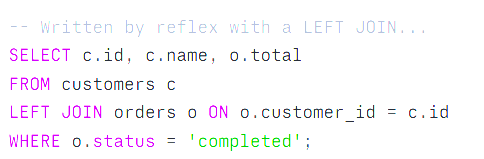
A LEFT JOIN keeps every row from the left-hand table even when there's no match on the right. That guarantee is exactly what constrains the optimizer: to make sure no left-hand row gets dropped, the planner loses the freedom to reorder the join or push filters down the way it can with an inner join. In my case, that constraint led to genuinely poor plans, the optimizer stopped using indexes and fell back to scanning entire tables row by row.
The real rule is: use the join that matches the semantics you actually need. If you truly need to keep unmatched left rows, a LEFT JOIN is correct, and you should use it. But a lot of LEFT JOINs in real codebases are there by reflex, where an INNER JOIN would return the same rows and give the planner room to choose a better, index-using plan. One tell: if you have a WHERE clause filtering on a column from the right-hand table, you've usually turned that LEFT JOIN into an inner join anyway, so write it as one.

4. Audit features and extensions you aren't using
Modern databases ship with more enabled-by-default machinery every release, and some of it costs you even when you never touch it. After a migration or version upgrade especially, new index types, background processes, or extensions can quietly consume memory or shift planning behavior in ways you didn't ask for. Inventory what's actually enabled, and turn off what you're not using.
5. Use JSON types where they fit, as a tool, not a default
If you're storing semi-structured or sparse data, native JSON types can be a real win. Most modern databases now support a binary JSON type stored in a pre-parsed form, so the database doesn't re-parse text on every read, and, importantly, it can be indexed for fast lookups (the index mechanism goes by different names across engines).
One honest caveat, since this is sometimes oversold: binary JSON is not a substitute for proper schema design when your data is genuinely relational. Use it for flexible, variable, or rarely-queried attributes, not as an excuse to dump everything into one column and lose the performance that real columns and indexes give you.
6. Keep your indexes clean and intentional
Indexes are the most over-applied performance tool there is. The instinct is to index everything; the result is a database that's slow to write and bloated to store, because every index has to be updated on every write.
Index for the queries you actually run. Plan the query first, then build the index that serves it. For composite indexes, column order matters, put the columns you filter on by equality first. Consider covering indexes (including the columns a query returns) so the database can answer straight from the index without touching the table. And periodically hunt down and drop indexes nothing uses; they're pure cost.
7. Read the query plan, stop guessing
Everything above is guesswork until you look at what the database is actually doing. Almost every engine can show you the execution plan and, better, run the query and report what really happened, most commonly through a variant of EXPLAIN ANALYZE.
This reveals where time actually went: which step was slow, whether it used an index or fell back to a full scan, and how the planner's estimated row counts compared to reality. That estimated-versus-actual gap is gold, a big mismatch is usually the root cause of a bad plan, and points straight at stale statistics or a query that needs restructuring. The exact command and options vary by database, so look up the form yours supports.
Almost every fix in this post started here. Before I changed a setting or rewrote a join, the query plan told me where the real bottleneck was.
The meta-lesson
None of these are exotic. The 100x regression that forced all of this on me wasn't some deep flaw in the database engine, it was a migration that drifted the configuration and reshaped a few queries, compounded by the usual pressure to move fast and not look back. The discipline that actually saves you is simple: measure first, tune the foundation before the queries, and use the join, type, and index that match what you actually need — not what you reached for out of habit.